Adobe vs Smallpdf Word to PDF for mobile users
Adobe is the better fit for users who want Acrobat ecosystem trust and larger-file handling, while Smallpdf is often better for fast, simple mobile conversions with a lighter interface. Adobe vs Smallpdf Word to PDF comparisons should come down to file limits, free-use caps, privacy statements, watermark claims, and how each workflow behaves on iPhone or Android. WordPDF is worth considering when the job is focused mobile DOCX-to-PDF conversion, especially when you want to open, check, and share the exported PDF from your phone.
> Definition: A Word to PDF app converts DOC, DOCX, and other Word document formats into PDF files for people using iPhone, Android, or a mobile browser.
- Pick Adobe if Acrobat integration, enterprise familiarity, and browser-based conversion for DOC, DOCX, RTF, and TXT files up to 100 MB matter most.
- Pick Smallpdf if a simple interface, quick one-off Word-to-PDF tasks, and lightweight web or app workflows matter most.
- For mobile users, upload speed, file size, privacy rules, free limits, and formatting complexity often matter more than brand name.
Adobe vs smallpdf word to PDF, side by side
Side-by-side captures of the compared products. Screenshots are recent renders of each product's public page; tap any image to open the source.
Adobe vs Smallpdf Word to PDF at-a-glance comparison
Adobe emphasizes Acrobat ecosystem depth, while Smallpdf emphasizes simple, quick everyday conversion. For mobile users, the real comparison is less about the logo and more about how fast the DOCX uploads, converts, downloads, and opens for a layout check.
| Criterion | Adobe | Smallpdf | Mobile takeaway |
|---|---|---|---|
| Mobile fit | Browser-based Acrobat online flow | Web, desktop, and mobile app options | Both can work from a phone, but test your file source first |
| Access points | Acrobat online, Adobe account paths | Smallpdf web and apps | Smallpdf often feels lighter for one-off use |
| Free-use constraints | May include limits or account prompts | May include quotas, limits, or plan prompts | Verify current rules before a deadline |
| Privacy considerations | Cloud processing and Adobe terms | Cloud processing and Smallpdf terms | Sensitive files need policy review |
| Best user type | Business or Acrobat-centered workflows | Casual, fast DOCX conversions | Match the tool to the handoff |
Adobe’s 2024 worker survey reported that PDF remains one of the most common business document formats knowledge workers encounter, according to its digital employee experience report source.
Five facts about Adobe, Smallpdf, and mobile DOCX-to-PDF conversion
These five facts cover the practical mobile differences between Adobe, Smallpdf, and dedicated DOCX-to-PDF converters. They are the points we check before trusting any tool with a resume, invoice, or client draft.
- Adobe’s online Word-to-PDF converter is part of the Acrobat ecosystem and states support for DOC, DOCX, RTF, and TXT files up to 100 MB.
- Smallpdf offers Word-to-PDF conversion as part of a PDF toolkit across web, desktop, and mobile apps.
- Both tools commonly depend on cloud upload and download steps for online and mobile conversion.
- Adobe tends to offer stronger ecosystem integration; Smallpdf tends to offer a simpler conversion-first interface.
- Both tools may have pricing, file-size, quota, account, or feature limits on free use, so users should verify current terms before relying on either tool.
Anyone dealing with a recruiter’s “PDF only” upload box at the last minute should care more about the exported file opening correctly than about feature depth. WordPDF fits that narrow job because the workflow centers on DOCX conversion, saved output, and a final phone-based layout check.
How Adobe vs Smallpdf Word to PDF conversion works on phones
Mobile Word-to-PDF conversion usually follows one data flow: select a Word file, upload it to a service, let the server convert it, then download or share the PDF. Browser-based conversion is not the same as fully offline conversion, even when the page feels app-like.
The conversion engine interprets document structure, font substitution, embedded objects, tables, margins, and page-size rules. In plain terms, the service rebuilds your Word layout as a fixed PDF page. That is why a contract draft from a client email can look fine in Word but gain a shifted page break after export.
Small things move.
Cellular upload speed, battery level, older phone processors, and app-to-app file handling all affect the experience. Good Word to PDF converter apps turn DOCX and Word documents into shareable PDF files on iPhone and Android, not broad editing suites with a conversion button buried three taps deep. WordPDF supports that narrower expectation by keeping the mobile handoff focused on conversion and review.
How to use Adobe Word to PDF or Smallpdf Word to PDF on mobile
Use the same basic workflow for Adobe, Smallpdf, or a dedicated mobile converter. The important part is checking the exported PDF before you send it, not just seeing a “done” message.
- Open the Word file from Files, Gmail, Google Drive, a chat app, or the Android Downloads folder.
- Check the file size, connection quality, and whether the document contains sensitive information before upload.
- Choose Adobe Word to PDF, Smallpdf Word to PDF, or WordPDF based on file limits and mobile share flow.
- Convert the DOC, DOCX, RTF, or TXT file and wait for the exported PDF to finish downloading.
- Inspect the PDF for page count, fonts, tables, logos, and shifted page breaks.
- Save the final copy to Files, Downloads, Drive, or attach it through the share sheet.
For iPhone users who live inside the Files app, our best Word to PDF app for iPhone guide goes deeper on share sheet behavior.
Where Adobe Word to PDF wins for mobile users
Adobe Word to PDF wins when Acrobat familiarity matters. If your company already expects Acrobat-compatible PDF workflows, Adobe feels safer because the converter sits inside the same ecosystem people recognize for viewing, commenting, and managing PDFs.
Adobe also states support for DOC, DOCX, RTF, and TXT files up to 100 MB for its online converter. Adobe lists supported formats and the 100 MB maximum on its Acrobat online converter page: source. That matters when a proposal has a sharp preview logo, multiple section breaks, and image-heavy pages. We still compare the Word file and PDF side by side, because a readable quote line item can shift under pressure.
Business users often choose Adobe because recipients know the Acrobat name and trust PDF output from that environment. For office admins archiving a final PDF, that familiarity can reduce back-and-forth.
For teams that already use Acrobat, Adobe is often easier than Smallpdf because it keeps Word-to-PDF conversion inside a known PDF workflow rather than introducing another service.
Where Smallpdf Word to PDF wins for mobile users
Smallpdf Word to PDF wins when the user wants a lighter interface and a quick one-off conversion. The web and mobile app paths are designed around simple file selection, conversion, and download, which can feel less crowded than a broader Acrobat ecosystem.
That simplicity helps when a kitchen counter invoice has to be sent by phone before the client meeting starts. Fewer choices can mean fewer wrong taps. However, lightweight does not mean unlimited, offline, or always watermark-free.
Smallpdf offers web, desktop, and mobile app availability, but users should verify current free limits, quotas, account requirements, and watermark behavior before relying on it. Smallpdf describes its web converter and app availability on its Word-to-PDF and apps pages: source. A classroom doorway essay submission rush is not the right time to discover a daily cap.
Casual users converting a few DOCX files may prefer Smallpdf because the interface stays close to the single task: upload Word, convert, download PDF.
Adobe vs Smallpdf Word to PDF pricing, limits, and privacy claims
Pricing, limits, and privacy claims can matter more than conversion speed when the document is sensitive or time-bound. Adobe and Smallpdf both change plan details over time, so treat any comparison as a prompt to verify the current provider page.
| Decision factor | Adobe | Smallpdf | What to check before upload |
|---|---|---|---|
| File-size caps | States up to 100 MB for online Word-to-PDF | Limits may vary by plan or session | Confirm current maximum file size |
| Daily task limits | May apply on free use | May apply on free use | Test before repeated daily conversions |
| Account prompts | Possible depending on use | Possible depending on use | Know whether sign-in is required |
| Paid plans | Acrobat ecosystem options | Smallpdf plan options | Compare only the features you need |
| Watermark claims | Check current output behavior | Check current output behavior | Convert a sample file first |
| Privacy | Cloud processing terms apply | Cloud processing terms apply | Review retention and organization rules |
Managers handling client contracts, HR forms, or regulated documents should not assume all cloud converters are equal. The best Word to PDF app for confidential documents page covers a stricter review path for sensitive files.
Adobe vs Smallpdf Word to PDF decision guide for iPhone and Android
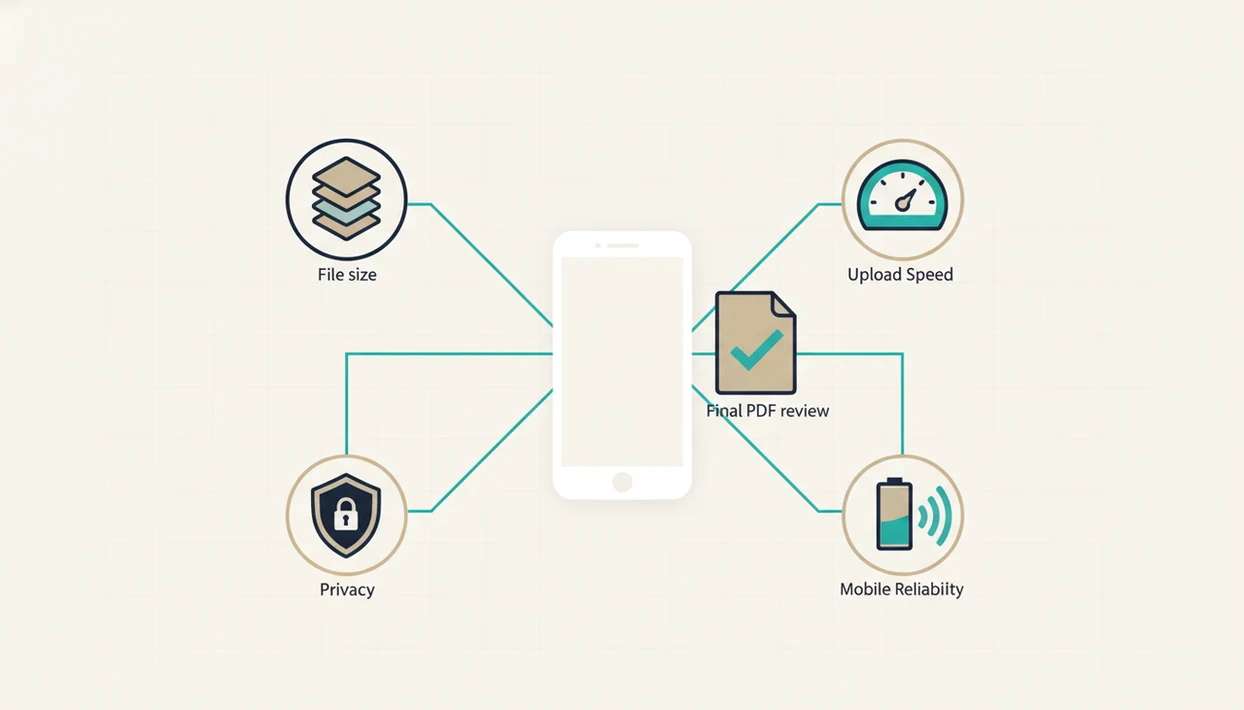
“Should I use Adobe or Smallpdf for Word to PDF on my phone?” Use Adobe if Acrobat trust, larger-file handling, and business-recipient familiarity matter most. Use Smallpdf if you want a lighter conversion path for a few everyday DOCX files.
If the file starts as an email attachment, cloud drive item, or chat upload, check how easily the phone passes it into the converter. On Android, the Downloads folder and Google Drive picker matter. On iPhone, Files preview and the share sheet matter. The tiny paperclip icon in Gmail is where many conversions either become easy or annoying.
Heavy mobile users should prioritize reliable share flow, predictable limits, and format checking. WordPDF fits repeated mobile conversion because it focuses on turning Word and DOCX files into saved PDFs without dragging the user into unrelated PDF tasks.
After a career fair hallway conversion, when the next step is a quick upload from cellular data, WordPDF earns its spot through a simple convert, preview, and share workflow. For Android-specific file handling, compare options in the best DOCX to PDF app for Android guide.
Evidence Sources for Adobe vs Smallpdf Mobile Conversion
The evidence for this comparison comes from provider documentation plus manual mobile workflow checks. Adobe’s stated file-type support and 100 MB maximum were taken from its converter page, while Smallpdf app availability and use-limit notes were checked against its converter and help materials.
For privacy, the review looked at policy language around cloud processing, uploaded files, account data, retention wording, and organizational controls. That does not mean Adobe and Smallpdf use the same retention rules or offer the same protections. It means sensitive files need a provider-specific read before upload, especially for HR, legal, medical, or client-confidential documents.
- Check Adobe’s current Word-to-PDF converter page for supported formats and maximum file size.
- Review Smallpdf’s current converter, apps, and help pages for platform access, quotas, and plan prompts.
- Test a sample DOCX on iPhone and Android for upload, conversion, download, preview, and share behavior.
- Compare the exported PDF against the original Word file for page count, tables, logos, and shifted breaks.
- Record the date checked, because prices, free quotas, watermark rules, and file limits can change quickly.
This page was reviewed with that split in mind: workflow behavior was tested manually, while published limits and availability claims came from provider documentation.
Limitations
Neither Adobe nor Smallpdf guarantees a flawless mobile conversion for every Word document. WordPDF also has boundaries, and those boundaries matter when a deadline is close.
- Neither tool guarantees pixel-perfect conversion for every Word document, especially with custom fonts, tables, images, and section breaks.
- Online and many mobile workflows require cloud upload and download, so offline use is limited.
- Free tiers may include file-size caps, task quotas, account prompts, watermark behavior, or other restrictions.
- Sensitive documents may not be suitable for cloud conversion without organizational approval.
- Performance depends on connection quality, file size, device age, battery condition, and available storage.
- Pricing, limits, privacy wording, and watermark policies can change without matching older reviews.
- WordPDF focuses on Word-to-PDF conversion, not general PDF editing, scanning, e-signatures, or PDF-to-Word recovery.
For formatting-heavy files, a dedicated best Word to PDF app without losing formatting comparison may be more useful than a brand-only Adobe versus Smallpdf decision.
FAQ
Is Adobe free for mobile document conversion?
Adobe offers a free online Word-to-PDF converter, but limits, account prompts, or paid-plan prompts may apply depending on current use rules.
Is Smallpdf free for mobile document conversion?
Smallpdf provides free access for some Word-to-PDF tasks. Users should verify current quotas, file-size limits, watermark rules, and plan requirements before relying on it.
Which tool keeps Word formatting better, Adobe or Smallpdf?
Both tools can preserve normal Word documents well. Complex fonts, tables, images, page sizes, and section breaks can still shift after conversion.
Does Adobe Word to PDF add a watermark?
Check Adobe’s current tool terms and output behavior before converting. Watermark, account, and free-use rules can change.
Does Smallpdf Word to PDF add a watermark?
Verify Smallpdf’s current free-tool behavior before sending a final file. Watermark, quota, and subscription rules may vary.
Which option works better on iPhone?
The better iPhone option depends on Files access, Safari or app behavior, upload speed, and share sheet convenience. Open the exported PDF in Files preview before sending.
Which option works better on Android?
The better Android option depends on file picker behavior, Google Drive access, installed app support, and connection quality. Check the converted file in Downloads before sharing.
Can I convert a Word document to PDF offline?
Online tools generally require cloud processing. Offline conversion depends on installed app capabilities, plan access, and local device storage.
Are uploaded Word files private when using Adobe or Smallpdf?
Privacy depends on each provider’s cloud processing, retention policies, and organizational rules. Sensitive or regulated documents may require approval before cloud conversion.